nuDefend Browser Guard is now available for Edge and Firefox
Links designed to steal your password no longer arrive only by email. They can turn up in a text about a package waiting for you, a WhatsApp message “from your bank,” an ad at the top of your search results, or a QR code on a sign in the street. Wherever the link comes from, it opens in the same place: your browser. That’s why we built nuDefend Browser Guard, a free extension that warns and stops visits to known phishing sites and sites that spread malicious software, before they open. Starting today, it’s available for Microsoft Edge and Firefox.
Why this protection belongs in your browser
Your email filter does important work, but it only checks email. A message on your phone, a link in a group chat, a sponsored ad, or a page opened from an app—all of these pass without being checked by your email filter. Those links all end up in your browser, which makes it the right place to check them.
In 2026, phishing messages also look more convincing than ever. AI tools write them in fluent, error-free language, so the spelling mistakes that once gave them away are no longer there. Fake sites copy the real thing down to the last detail. Relying on appearances is no longer enough. A check against a list of sites already identified as dangerous isn’t swayed by convincing design.
What happens when you click a dangerous link
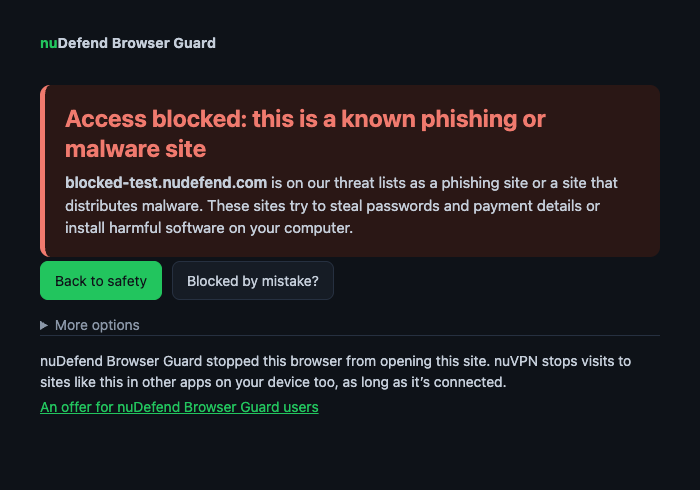
When you open a known phishing site or a site known to spread malicious software, a clear warning from nuDefend Browser Guard appears instead. You can go back with one click. If you think the site was blocked by mistake, use the report button on the warning page. We receive your report, review it manually, and correct the list.
The list includes more than 400,000 known phishing sites and sites that spread malicious software, and it’s updated several times a day. If a site is added in the morning, the extension will stop you from visiting it that same day.
What you’ll see in the extension window
Click the extension icon to open a small window showing the number of visits stopped in this browser and a “Recently blocked” list. Every attempt to visit a dangerous site counts, including repeat attempts to visit the same site. The list is stored only in your browser, and you can clear it with a click.
No account, no ads, no tracking
Checks happen inside your browser, and your browsing history stays with you. The extension is free, with no ads and no account or sign-up required. Install it, and it works. The extension’s privacy policy explains in plain language exactly what is sent from your browser and when.
Want to see how it works?
We’ve set up a permanent test address: blocked-test.nudefend.com. It isn’t dangerous, but the extension treats it as a blocked site. Open it after installation to see the warning page exactly as it will appear when you try to visit a genuinely dangerous site.
Where to install
The Safari version is currently under review by Apple, and the Chrome version is on the way. You’ll find all the details, screenshots, and frequently asked questions on the nuDefend Browser Guard page.