nuDefend Browser Guard is now available for Chrome too
Most people browse with Chrome, so it’s also where most dangerous links get opened. Starting today, nuDefend Browser Guard is available in the Chrome Web Store too. Install it with one click, and it starts working right away.
What the extension does
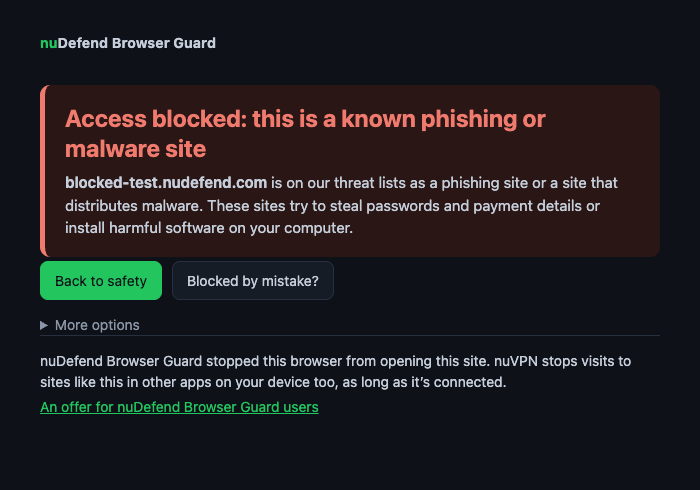
Opened a link to a site already identified as a phishing site or one that distributes malware? Instead of the site, you’ll see a clear warning page where you can go back with one click. It works wherever the link came from: email, SMS, a WhatsApp message, an ad in search results or a QR code.
The blocklist includes more than 400,000 known sites and is updated several times a day. A site added to the list in the morning will be blocked in your browser that same day.
Your browsing stays with you
Checks happen inside your browser. Your browsing history isn’t sent to us, and you don’t need an account or registration. The extension is free and has no ads. The extension’s privacy policy explains in plain language what is sent from your browser and when.
How to install in Chrome
- Open the extension’s page in the Chrome Web Store and click "Add to Chrome".
- Confirm that you want to add the extension in the window that opens.
- Want to see the extension in action? Open the test address
blocked-test.nudefend.com. The address is harmless, but the extension treats it as a blocked site and displays the warning page.
Also available for Edge and Firefox
The extension is also available for Microsoft Edge and Firefox. You’ll find full details and frequently asked questions on the nuDefend Browser Guard page.